Breaking News
Popular News




Enter your email address below and subscribe to our newsletter
Smart Discovery Store

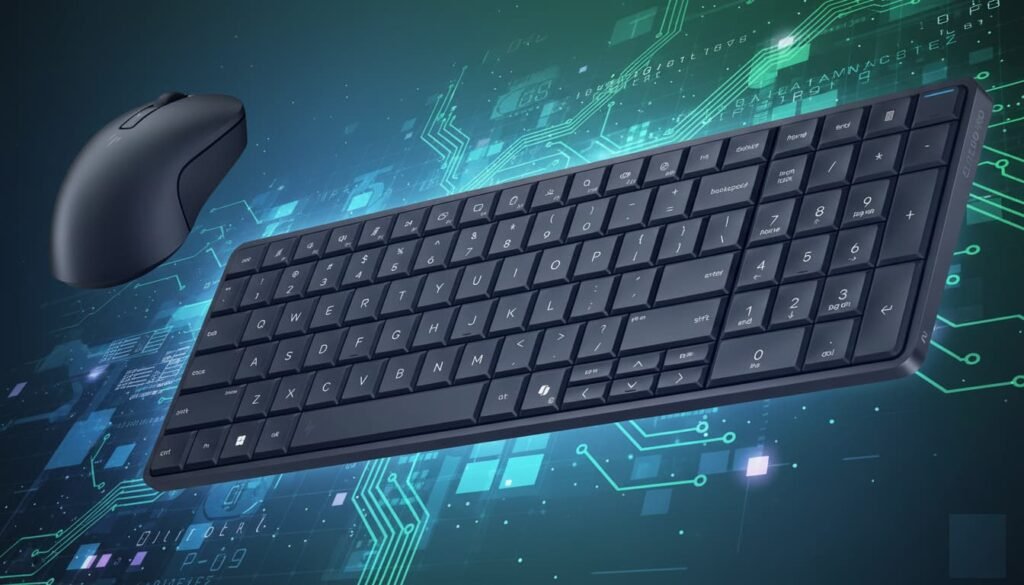
The HP Elite Board G1A looks like a sleek, premium keyboard at first glance, but underneath the keys lives a full Windows PC powered by an AMD Ryzen processor. Instead of carrying a laptop back and forth between home and office, this device lets you travel with a compact keyboard that becomes your entire computer the moment you connect it to a display. HP officially revealed it at CES 2026, and early hands-on impressions show a surprisingly polished and practical product aimed at mobile professionals, hybrid workers, and minimal desk setups.
The Elite Board G1A feels more like a premium mechanical keyboard than a computer. The chassis is solid metal with virtually no flex or creaking. It has the rigidity and weight balance of a high-end productivity keyboard, which makes it feel durable enough for daily travel in a backpack or work bag. Despite housing a processor, cooling system, speakers, battery, storage, and ports, the device remains impressively slim and clean in appearance.
The keyboard layout includes a full numeric keypad, making it well suited for spreadsheets, accounting work, coding, and productivity tasks. Key travel feels deep and controlled with excellent tactile feedback, making long typing sessions comfortable. The overall finish looks professional and understated, fitting well in both office and creative environments.
Ventilation is subtly integrated into the rear section, allowing airflow without disrupting the minimalist aesthetic. Speakers are built directly into the chassis and are surprisingly powerful for a device of this size. The result is a keyboard that feels like a premium accessory while quietly functioning as a complete computer.
One of the biggest advantages of the Elite Board G1A is how light the full setup remains. The keyboard alone weighs roughly 760 grams, staying well under one kilogram. When you include the included Bluetooth mouse, USB-C charging cable, and compact 65W GaN charger, the total travel weight lands close to one kilogram, making it far lighter than most laptops.
This makes it practical for commuters who move between fixed workstations that already have monitors. Instead of carrying a laptop and power brick every day, users only need the keyboard PC and a single cable. For users who need a mobile screen, pairing it with a portable USB-C monitor still keeps the total travel weight far below traditional laptop setups.
The compact footprint also makes it easy to store in backpacks without occupying much space, leaving room for accessories, documents, or camera gear.
The Elite Board G1A keeps port selection simple and modern. It features two USB-C ports, one supporting up to 40Gbps and the other supporting 10Gbps. These ports handle power delivery, display output, data transfer, and docking, keeping cable management minimal.
A Kensington lock slot adds physical security for shared workspaces or public environments. While there are no HDMI, USB-A, or SD card ports built in, users can easily expand connectivity using a USB-C hub or docking station. This approach keeps the device slim while still supporting flexible workstation setups.
When connected to a portable display or desktop monitor, a single USB-C cable can provide power passthrough while transmitting video and data, creating a clean one-cable workstation experience.
The Elite Board G1A shines when paired with portable monitors or existing desk displays. When connected to lightweight 2.5K or 4K USB-C displays, it transforms into a full desktop workstation in seconds. Touch-enabled monitors and pen input displays also work seamlessly, expanding creative workflows for designers, note-takers, and presenters.
For home and office users who already maintain monitors at each location, the keyboard PC becomes the only device that needs to travel. For remote work, coworking spaces, or hotel rooms, pairing it with a slim portable monitor creates a complete dual-screen setup without the bulk of a laptop.
The built-in battery allows short unplugged operation, but it is primarily designed as a portable desktop rather than a traditional laptop replacement. Continuous power delivery keeps performance consistent and avoids workflow interruptions.
Despite its compact size, the built-in speakers deliver surprisingly rich and clear audio. Voice clarity remains strong for video calls, while music playback provides respectable volume and balance for casual listening. The speaker placement within the keyboard chassis helps direct sound upward toward the user rather than muffling it against a desk surface.
Typing noise remains controlled and office-friendly, making it suitable for meetings, shared spaces, and long writing sessions. Key response remains consistent across the entire keyboard, including the numeric keypad, ensuring reliable performance for fast typing and data entry.
Everyday productivity tasks such as document editing, spreadsheet work, web browsing, and conferencing feel natural due to the familiar keyboard form factor and stable desk positioning.
Inside the Elite Board G1A sits an AMD Ryzen processor paired with onboard memory and internal storage. While final benchmark numbers are not yet available, early impressions suggest performance strong enough for mainstream productivity workloads, light creative tasks, and multitasking environments.
The integrated cooling system quietly manages thermal output while maintaining comfortable surface temperatures. This makes the device suitable for extended use without noticeable fan noise or heat buildup.
Because the device runs full Windows, software compatibility remains identical to a traditional desktop or laptop. Users can install productivity suites, creative tools, development environments, and enterprise software without limitations.
The Elite Board G1A is well suited for professionals who move between fixed workstations, hybrid employees, consultants, students with shared desk environments, and creators who want a clean modular setup. It reduces the need for carrying heavy laptops while maintaining full desktop flexibility.
It also works well for minimalist desk setups, compact home offices, digital nomads using portable monitors, and corporate environments where standardized docking stations are already deployed.
Rather than replacing high-performance laptops or gaming systems, it fills a unique niche as a lightweight, modular desktop replacement focused on productivity and mobility.
The HP Elite Board G1A represents a clever rethink of portable computing. By embedding a full PC inside a premium keyboard, HP delivers a highly portable, flexible, and professional solution for users who value mobility without sacrificing real desktop workflows. Strong build quality, excellent typing feel, lightweight travel footprint, modern USB-C connectivity, and surprisingly capable audio make it one of the more innovative devices emerging from CES 2026.
As production units become available and performance testing begins, this keyboard PC has the potential to carve out a new category between laptops and traditional desktops for users who prioritize simplicity, portability, and modular workspace design.D Display Technology and Visual Performance
The centerpiece of the refreshed XPS lineup is the adoption of tandem OLED display technology across both size classes. The panel delivers high peak brightness, excellent color accuracy, and deep contrast ratios typically associated with premium creative monitors. The InfinityEdge design minimizes bezel thickness while maintaining structural integrity around the panel perimeter.
Variable refresh rate support allows the display to dynamically scale between low refresh operation for static content and up to 120 Hz for motion-intensive workflows. This adaptive behavior balances responsiveness with energy efficiency, contributing to extended battery longevity during mixed workloads.
Resolution targets the 3K class, delivering sharp text rendering without overburdening integrated graphics pipelines. Touch input is supported with improved anti-glare coating that significantly reduces reflections under studio lighting and bright indoor environments. HDR capability enables high dynamic range content playback with improved highlight detail and shadow depth.
While the tandem OLED panel is optional rather than standard, it establishes a clear differentiation tier within the lineup for users prioritizing visual fidelity. The base configuration retains IPS technology for cost efficiency, preserving accessibility while allowing premium upgrades for display-sensitive professionals.
Color consistency across viewing angles remains strong, and brightness uniformity avoids the common banding issues associated with earlier OLED laptop implementations. For content creation, media consumption, and productivity workflows, the display quality competes directly with high-end mobile workstations and creative laptops.
Dell addressed multiple usability complaints from prior XPS generations with tangible improvements across the input surface. The controversial touch-based function row has been replaced with a traditional physical function key layout, restoring tactile feedback and eliminating accidental activations during blind typing.
Key travel has been recalibrated to deliver firmer tactile response without increasing overall thickness. Stabilization has improved, reducing lateral wobble on larger keys while maintaining quiet actuation suitable for shared environments. The keyboard now supports extended typing sessions without fatigue, balancing firmness and rebound consistency.
The touchpad introduces subtle physical edge boundaries that allow fingers to sense transitions without visual confirmation. This change improves precision gestures and reduces overshoot errors during multi-touch navigation. Haptic feedback remains consistent across the surface, providing reliable click simulation without mechanical movement.
Webcam hardware receives a substantial upgrade with an 8-megapixel sensor integrated into the thin display lid. Image quality improves clarity, low-light performance, and color accuracy during video conferencing. Infrared support enables facial authentication, compensating for the removal of fingerprint readers in the current configuration.
Audio tuning benefits from refined speaker placement and resonance chamber optimization, delivering cleaner mids and improved spatial separation for video calls and media playback.
Powering the new XPS models are Intel Core Ultra Series 3 processors built on the Panther Lake architecture. These chips integrate enhanced CPU cores alongside significantly upgraded Xe graphics configurations, scaling up to 12 graphics cores in top-tier models. Memory bandwidth improvements and architectural optimizations target efficiency gains rather than raw wattage escalation.
Memory capacity scales up to 64 GB with high-speed modules, enabling multitasking-heavy workflows such as large dataset analysis, multi-VM environments, and creative production pipelines. Storage support extends to PCIe Gen 5 SSDs with capacities reaching 4 TB, offering fast sequential throughput and low latency access for large project files.
Thermal engineering received meaningful revisions, with larger cooling fans and improved airflow channeling inside the thinner chassis. The redesigned cooling system aims to sustain higher boost clocks without aggressive thermal throttling while maintaining acceptable acoustic levels during prolonged loads.
Discrete GPU options are currently absent in the initial launch lineup, relying exclusively on integrated Xe graphics. While integrated performance improvements are substantial, heavy 3D rendering or advanced gaming workloads remain outside the primary target segment. Dell has indicated future expansion of the XPS lineup with alternative configurations, signaling potential GPU-equipped variants later in the cycle.
AI acceleration benefits from the latest neural processing blocks embedded within the Core Ultra platform, enabling local inference workloads for productivity enhancements, creative tools, and background optimization tasks without continuous cloud dependency.
Port selection emphasizes modern connectivity with three Thunderbolt 4 ports serving as the primary expansion interface. This design prioritizes bandwidth flexibility over port diversity, enabling docking solutions, external GPUs, and high-resolution display output through adapters. Legacy ports such as HDMI and SD card readers are omitted, encouraging modular accessory usage.
Wireless connectivity benefits from updated radio modules delivering improved throughput and stability in congested environments. Bluetooth performance supports low-latency peripherals and multi-device pairing without degradation.
Battery capacity remains consistent across both the 14-inch and 16-inch models at approximately 70 watt-hours. Despite identical capacity, the smaller display footprint of the 14-inch model yields marginally longer runtime expectations. Dell utilizes a newer battery cell technology that improves energy density while reducing physical mass.
Projected endurance targets include extended video playback scenarios exceeding typical ultrabook benchmarks, particularly in LCD configurations. OLED variants may exhibit slightly reduced runtime due to panel power characteristics but remain competitive within premium categories.
Power management integrates adaptive refresh control, CPU scheduling optimizations, and thermal load balancing to sustain extended unplugged workflows without aggressive throttling.
The refreshed XPS lineup repositions Dell aggressively against premium ultrabooks and creative laptops that dominate the upper-tier productivity segment. By restoring traditional usability elements while modernizing display technology and internal architecture, the platform balances innovation with ergonomic stability.
Weight reductions improve mobility parity with lightweight competitors while preserving premium materials and rigidity. The tandem OLED display elevates visual differentiation, especially for users prioritizing color fidelity and media workflows. Integrated graphics advancements reduce dependency on discrete GPUs for mainstream professional tasks.
Pricing tiers reflect modular scalability, allowing buyers to optimize configurations based on display choice, memory capacity, and storage requirements. The absence of discrete GPU options keeps thermal complexity low and preserves battery efficiency but may limit appeal for specialized creative workloads.
Future expansion within the XPS ecosystem suggests additional variants, potentially addressing performance tiers and port diversity based on market feedback. The current generation establishes a strong foundation focused on refinement rather than radical redesign.
By correcting prior usability missteps, improving portability, and delivering tangible platform upgrades, the XPS 14 and XPS 16 restore credibility within the premium Windows laptop segment and signal a renewed commitment to long-term product evolution rather than short-lived experimentation.