

Smart Discovery Store
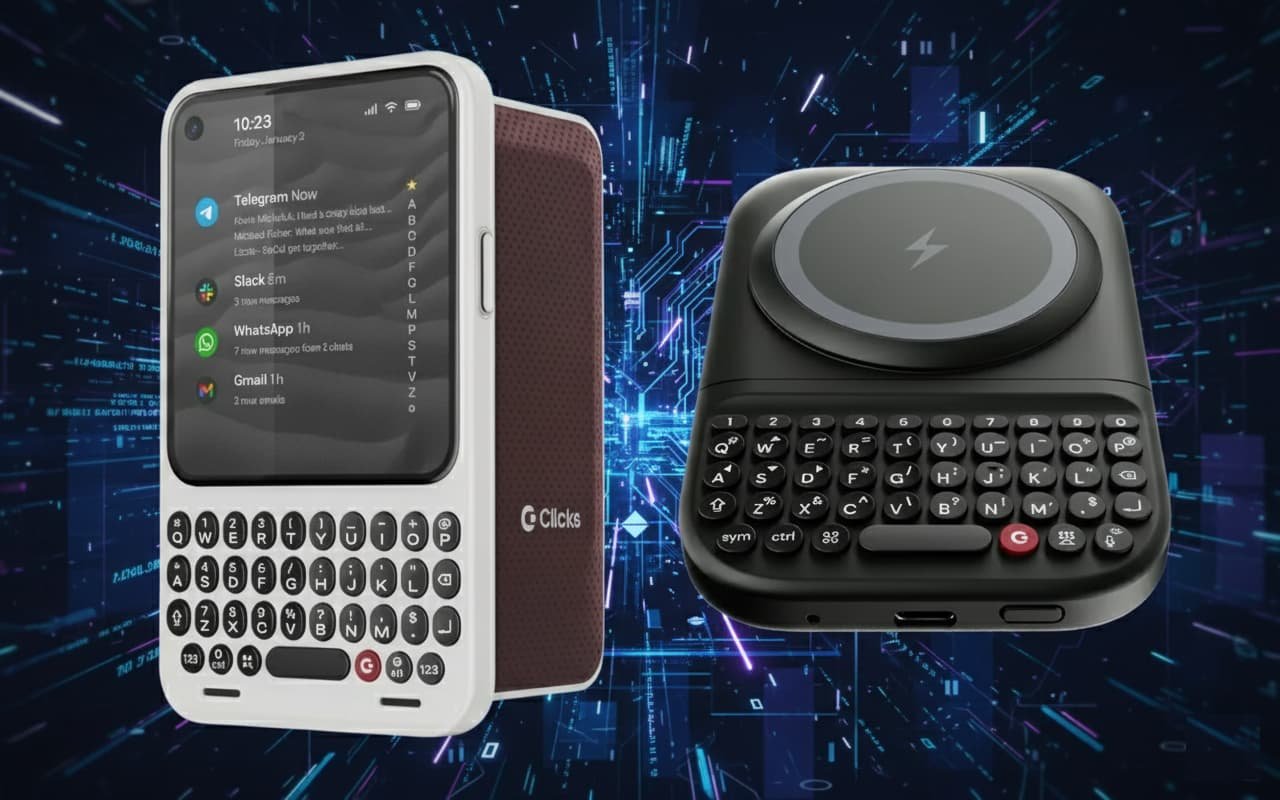
Clicks Power Keys : A Universal Slide-Out Keyboard That Brings Real Buttons Back
Over the past decade, mobile devices have steadily removed physical input in favor of glass-only interaction. While touchscreens enabled thinner devices and flexible layouts, they also eliminated tactile feedback, precision, and muscle memory—qualities that defined iconic mobile keyboards from earlier eras. Even as productivity tasks increasingly move to phones and tablets, typing remains one of the weakest parts of the modern mobile experience.
Clicks Power Keys was designed to address that gap without being tied to a single phone model or operating system. Instead of building another phone-specific keyboard case, this product takes a universal approach, reintroducing real buttons through a standalone Bluetooth keyboard that physically integrates with a device when needed and disappears when it is not.
The result is not just a keyboard accessory, but a hybrid input and power solution aimed at users who type frequently on mobile hardware and want flexibility across multiple devices.
Hardware Design: Keyboard Meets Power Pack
Clicks Power Keys is roughly the size of a compact portable battery pack, and that form factor is intentional. Inside the chassis is a 2,150 mAh battery designed to wirelessly charge a phone while it is mounted. A magnetic docking ring allows the keyboard to attach to MagSafe-enabled iPhones or Qi2-compatible Android phones. Devices without native magnetic support can still be used with a compatible MagSafe-style case.
When typing is required, the phone slides upward on a built-in rail system, revealing the full physical keyboard underneath. This slider mechanism supports two height positions, allowing it to accommodate a wide range of phone sizes, including larger and thicker devices. When typing is finished, the keyboard slides back under the phone, restoring a more compact profile.
Because the keyboard does not rely on a wired USB connection, the phone’s port location becomes irrelevant. The device can be mounted in portrait or landscape orientation, giving users freedom to choose the layout that best suits their task.
Bluetooth Connectivity and Multi-Device Flexibility
Unlike earlier keyboard accessories that depended on direct physical connections, Power Keys uses Bluetooth for input. This design choice significantly expands its usefulness. The keyboard can connect to multiple devices, not just phones, and can switch between them as needed.
This allows Power Keys to function as a general-purpose input device. It can be paired with tablets, foldables, televisions with Bluetooth support, VR headsets, and other devices that typically suffer from poor on-screen keyboards. Text entry on smart TVs, for example, becomes dramatically easier with physical buttons rather than navigating virtual keyboards using a remote.
Because Bluetooth input is independent of the mounting mechanism, Power Keys does not need to be physically attached to a device in order to type. It can be used wirelessly at a distance, expanding its role beyond a phone accessory into a compact productivity keyboard.
Keyboard Layout and Typing Experience
The keyboard itself is designed by engineers with experience creating some of the most well-regarded mobile keyboards of the past. It uses sculpted keycaps similar to those found on recent Clicks phone keyboards, providing defined edges and clear separation between keys. This improves accuracy and reduces typing fatigue compared to flat or low-contrast layouts.
Backlighting is included, making the keyboard usable in low-light environments. A dedicated number row has been added, significantly improving usability for passwords, spreadsheets, and technical input. The presence of a number row also frees up additional alternate characters, including directional arrow keys mapped to letter positions.
The tactile feel prioritizes responsiveness over softness, reinforcing confidence with each press. While the keyboard is compact, the layout is optimized to avoid accidental presses and to support fast, sustained typing sessions.
Landscape Mode and Mobile Productivity
One of the less obvious but most impactful benefits of Power Keys is how it enables landscape use without sacrificing screen space. Because the virtual keyboard is no longer needed, applications gain more vertical and horizontal room. This is particularly valuable for tasks such as working with spreadsheets, reviewing documents, reading PDFs, or managing dashboards.
Landscape orientation also enables more effective multitasking on Android devices. Split-screen applications become genuinely usable when the on-screen keyboard is no longer occupying half the display. This transforms phones into more capable productivity tools, especially when paired with larger foldables or tablets.
For users who regularly edit documents, analyze data, or work remotely from a phone, this combination of physical keyboard and flexible orientation meaningfully changes how mobile devices can be used.
Charging Integration and Portability
Power Keys doubles as a wireless charger, allowing a phone to recharge while it is docked. This reduces the need to choose between typing and maintaining battery life. The internal battery is sized to provide practical supplemental charging rather than full multi-day endurance, aligning with its role as an accessory rather than a primary power bank.
The keyboard can be detached easily when a slimmer carry is needed. This modularity allows users to adapt their setup depending on the day—using Power Keys when heavy typing is expected and leaving it behind when minimalism is preferred.
The overall design balances durability with portability. Materials and construction prioritize frequent sliding and docking without excessive wear, reflecting its intended daily-use role.
Beyond Phones: A Broader Input Tool
While Power Keys was clearly designed with phones in mind, its Bluetooth-first approach enables broader applications. Typing in VR environments, where virtual keyboards are slow and imprecise, becomes significantly more practical. Smart TVs benefit from faster text input without interrupting viewing experiences. Tablets gain a more pocketable alternative to larger keyboard covers.
This versatility positions Power Keys not as a niche nostalgia product, but as a modern response to the fragmentation of devices and input methods. Instead of owning multiple keyboards for different platforms, users can rely on a single device that adapts to many contexts.
Market Context and Differentiation
Pocket-sized Bluetooth keyboards are not new, but many existing options prioritize low cost over quality. Common issues include flimsy construction, poor key feel, awkward layouts, and limited longevity. Power Keys differentiates itself by combining multiple roles—keyboard, mount, and wireless charger—into a single cohesive product.
The sliding design allows the keyboard to disappear when not in use, avoiding the bulk of permanently attached accessories. Magnetic mounting simplifies alignment without requiring precise mechanical connectors. The emphasis on key feel and layout reflects a focus on sustained usability rather than novelty.
This product is positioned as a premium accessory, not a disposable gadget. Its pricing reflects the additional engineering and materials involved, while still remaining accessible compared to specialized professional input devices.
Pricing and Availability
Clicks Power Keys is scheduled to ship in the spring. Early pre-orders are offered at a reduced price, with standard pricing applying after the launch window closes. Initial availability is limited to a single colorway, with additional options dependent on market demand.
The product is designed to complement existing Clicks devices but does not require them. It can function independently as a universal keyboard, making it accessible to users regardless of their current phone or ecosystem.
The Communicator and the Rise of Specialty Devices
Alongside Power Keys, Clicks has previewed an upcoming device called Communicator. This product targets users who carry a secondary, purpose-built mobile device alongside a primary smartphone. Rather than replacing a phone, Communicator aims to serve a specific role within a multi-device workflow.
This approach reflects a broader trend toward specialized hardware that prioritizes function over generality. As mobile computing continues to diversify, accessories and secondary devices are increasingly filling gaps left by mainstream smartphones.
A Practical Return to Physical Input
Clicks Power Keys demonstrates that physical keyboards still have a place in modern mobile computing when thoughtfully designed. By removing platform lock-in, embracing Bluetooth, and integrating power delivery, it avoids many of the limitations that defined earlier attempts at mobile keyboards.
Instead of trying to recreate the past, it reframes tactile input as a flexible tool for a multi-device world. For users who type often, work across screens, or simply prefer the certainty of real buttons, Power Keys offers a compelling alternative to glass-only interaction without demanding a change in phone choice or workflow.