


Smart Discovery Store
Swiftpoint Z2 Gaming Mouse – Extreme Customization, a Feature-First Design
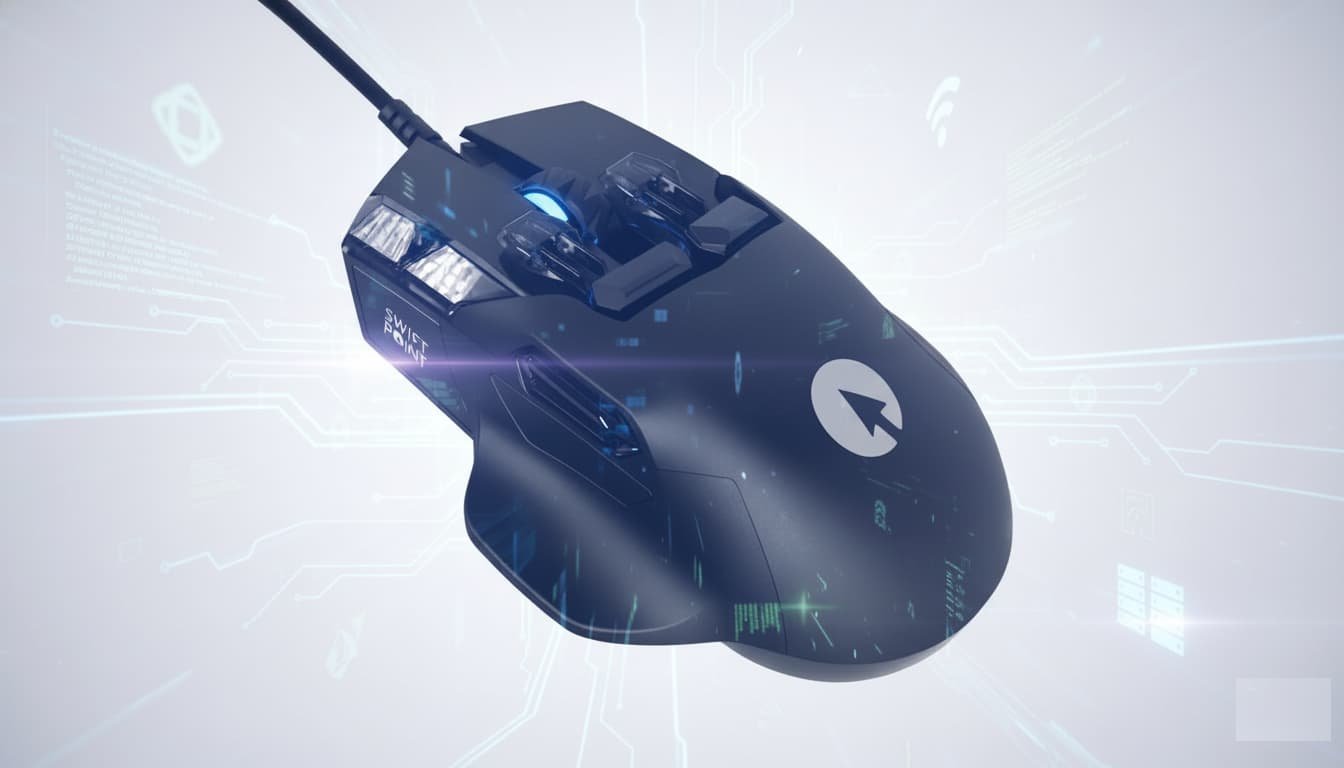
The Swiftpoint Z2 does not follow traditional gaming mouse design rules. Its shape, button density, and modular components prioritize experimentation over familiarity. The body is compact but tall, with aggressive contours and rubberized grip zones placed across the thumb rest, finger channels, and pinky supporThe Swiftpoint Z2 does not follow traditional gaming mouse design rules. Its shape, button density, and modular components prioritize experimentation over familiarity. The body is compact but tall, with aggressive contours and rubberized grip zones placed across the thumb rest, finger channels, and pinky support. These surfaces are designed to anchor the hand during complex input actions, though long-term comfort depends heavily on hand size and grip style.
The mouse ships with multiple interchangeable components, including different button caps and removable base plates. This modularity allows the Z2 to change how it feels and behaves without external accessories. The design is unapologetically unconventional, aimed at users who want a mouse that functions as a control hub rather than a simple pointer.
Button Layout, Pressure Sensitivity, and Input Depth
One of the defining traits of the Swiftpoint Z2 is its sheer number of inputs. Including primary clicks, side buttons, top-mounted controls, tilt actions, scroll interactions, and pressure-based “deep click” inputs, the mouse exposes up to 13 programmable controls. Many of these inputs are pressure-sensitive, allowing different actions based on how firmly a button is pressed.
Button tactility varies by design. Standard Omron switches provide crisp primary clicks, while auxiliary buttons range from firm to soft depending on the installed cap. High-profile button caps make inputs obvious and tactile, while low-profile caps reduce accidental presses and favor precision. This flexibility allows users to tune the mouse for MMO-style macros, productivity shortcuts, or layered control schemes.
The side buttons are arranged vertically rather than front-to-back, which may require adjustment during fast gameplay. While this configuration works well for deliberate actions, it can increase misclick risk for users accustomed to traditional layouts.
Gyroscope, Tilt Control, and Joystick Attachment
The Swiftpoint Z2 integrates a built-in gyroscope, enabling the mouse to detect tilt, rotation, and movement in three-dimensional space. This feature allows actions to be mapped to left-right tilting, forward-back rocking, or full gyro motion depending on configuration.
Two interchangeable base plates define how tilt behaves. One provides a flat, stable glide, while the other introduces controlled tilt angles. The tilt plate itself can be installed in multiple orientations, adjusting sensitivity by changing how aggressively the mouse responds to movement. Visual markings on the base guide this setup, making the system approachable despite its complexity.
An optional magnetic joystick attachment replaces tilt input with a dedicated thumb joystick. Once installed, the mouse switches from tilt detection to full gyro-based control. This mode is experimental by design, offering an alternative input style for flight simulators, camera control, or creative applications. While novel, it does not replace dedicated controllers for serious simulation use, but it demonstrates the Z2’s ambition to blur the line between mouse and controller.
Sensor Performance, Weight, and Hardware Specifications
At the core of the Swiftpoint Z2 is the PixArt PAW3395 optical sensor. It supports up to 26,000 DPI, 650 inches per second tracking, and 50g acceleration. While capable, it is not positioned as a bleeding-edge competitive sensor. The mouse operates at a 1000Hz polling rate and is wired via a fixed six-foot cable.
Weight is substantial at approximately 120 grams depending on configuration. This places the Z2 firmly outside the ultralight gaming category. The heft contributes to stability during complex inputs but can cause fatigue in fast-paced shooters or extended sessions. This weight, combined with higher-than-average measured input latency, positions the Z2 away from esports-focused use cases.
Additional hardware elements include an OLED display on the mouse body, RGB lighting zones, and exposed debug pins on the underside. The display can show DPI, profile status, pressure data, tilt angles, or custom messages, turning the mouse itself into a live status dashboard.
Software Ecosystem and Profile Customization
The Swiftpoint software is where the Z2 fully reveals its identity. Every input can be reassigned, layered, or modified with conditions such as pressure thresholds, tilt direction, scroll behavior, or movement context. Users can create profiles per game or application, with automatic switching based on active software.
Profiles are stored both locally and on the mouse, supporting up to 20 onboard configurations. This allows the Z2 to retain behavior across systems without reinstallation. The interface also provides real-time visual mapping of assignments, helping users keep track of complex setups during gameplay.
Advanced features include modifier layers, macro sequencing, tilt-to-scroll functions, and directional actions mapped to physical motion. While powerful, the system can feel overwhelming. The depth of customization rewards experimentation but demands time and patience to master.
Gaming Use Cases and Productivity Applications
In gaming, the Swiftpoint Z2 excels in genres that benefit from numerous inputs rather than raw speed. MMO and strategy players can assign abilities, menus, and macros across easily reachable buttons without relying on keyboard shortcuts. Tactical shooters may find tilt-based leaning useful, though traditional keyboard inputs often remain faster for competitive play.
For productivity, the Z2’s strengths become more apparent. Editing software, CAD tools, timeline navigation, and multitasking workflows benefit from layered commands and pressure-sensitive inputs. Tilt scrolling, deep-click modifiers, and gesture-based controls allow complex operations to be executed without leaving the mouse.
The joystick and gyro functions add experimental value but remain situational. They are best viewed as optional tools rather than core features, enhancing niche workflows rather than replacing standard peripherals.
Value Proposition and Target Audience
The Swiftpoint Z2 is priced as a premium device, reflecting its mechanical complexity and software depth. It is not positioned for mainstream gamers seeking simplicity or competitive performance. Instead, it targets enthusiasts who enjoy configuring hardware, exploring alternative input methods, and pushing beyond conventional mouse limitations.
This mouse prioritizes features over minimalism and experimentation over tradition. It may feel excessive or impractical to some users, but for others it offers a level of control unmatched by conventional designs. The Z2 represents a feature-forward approach that challenges assumptions about what a mouse can be, serving as both a powerful tool and a platform for innovation.